

AI Search: how assistants describe your brand
Search engines send people to your site. Assistants answer the question instead. AI Search measures the second one: when somebody asks Claude, ChatGPT, Gemini or Perplexity a question your business should own, do you get mentioned, and what do they say?
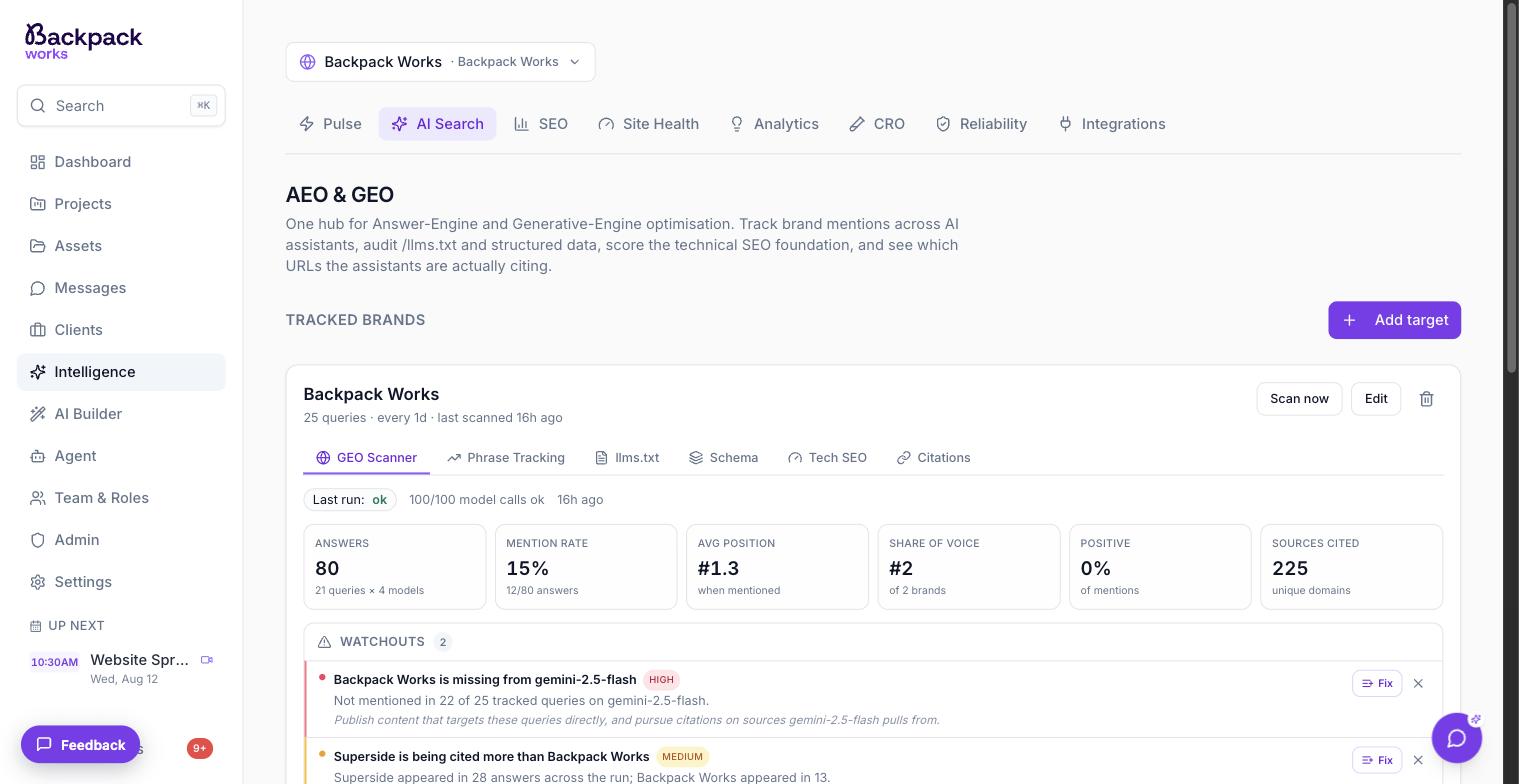
Setting up a target
Press Add target and fill in:
- Brand name and any aliases you are known by.
- Origin URL — required for the llms.txt, Schema and Tech SEO tabs to work at all.
- Competitors — who you expect to show up alongside you. These also seed the Competitors page.
- Queries — 5 to 25 questions you want monitored. Suggest with AI will draft 25 from your site if you would rather start there and edit.
- Cadence in days, and whether the target is enabled.
Every query runs against all four assistants, so 25 queries is 100 answers per scan. Scans cost money per run, which is why cadence is yours to set.
You do not need to press Scan now for the first run. Opening the page kicks off a scan for any enabled target that has never run.
Reading the GEO Scanner
Six numbers across the top:
- Answers — how many responses were collected (queries × models).
- Mention rate — what share of those answers mentioned you at all.
- Avg position — where you appear when you do get mentioned. First is better.
- Share of voice — your rank against the other brands in the same answers.
- Positive — sentiment across mentions.
- Sources cited — how many distinct domains the assistants drew on.
Below that: share of voice against competitors, model coverage, sentiment split, position distribution, and a Query performance table with a Beating you column that names who won each query. That column is usually the most actionable thing on the page.
Watchouts sit above the detail and each carries a Fix button that creates a task.
The other tabs
llms.txt — whether you publish one, what is in it, and an AI-written starter draft. Publish opens a pull request if your site is on GitHub; otherwise it creates a task.
Schema — your JSON-LD structured data coverage, with recommendations and copyable snippets.
Tech SEO — a score with a factor-by-factor breakdown and a ranked list of top actions.
Citations — the URLs assistants are actually citing, split into yours and theirs. If they are citing a competitor's comparison page to answer a question about you, this is where you find out.
Phrase Tracking — individual phrases over time with trend and standing.
Schedules
GEO scans are checked daily and run when a target's cadence is due. The llms.txt, Schema and Tech SEO scans refresh weekly on Mondays at 11:00 UTC. A weekly digest goes out on Mondays at 13:00 UTC to anyone in your organisation who has opted in, for any target scanned successfully in the last two weeks.
Targets belong to a site
A target you create here is attached to this site. If you manage several sites, each one has its own targets — a brand tracked on one will not appear on another.