

Site Health: audits, issues and what changed
Site Health is five tabs over one crawl: Audits, Pages, Issues, Changes and Alerts. Audits is where a site lands by default.
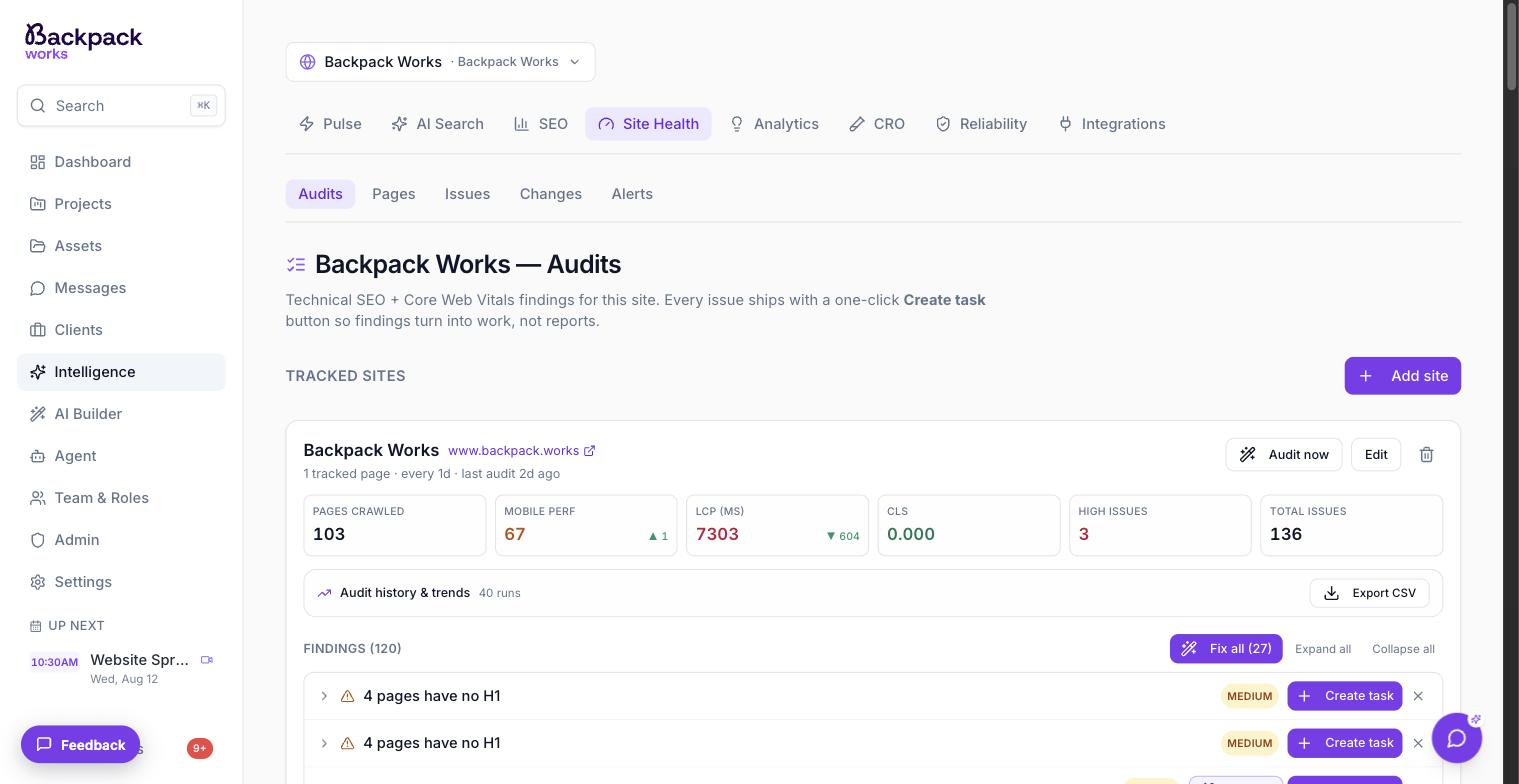
When the crawl runs
The crawler runs daily at 08:00 UTC, but it only crawls a site whose cadence is due. Cadence is set per site in Edit and defaults to every 7 days. Set it to 0 and the site is crawled only when you press Audit now.
A run takes 60 to 180 seconds depending on how many pages you track. The site card shows "N tracked pages · every Nd · last audit …" so you can always tell what it is set to and when it last happened.
If the daily crawl fails twice and the last success is older than double your cadence, a banner appears on the page with the actual error. It is not a generic "something went wrong" — it names what failed.
Findings, and turning them into work
Every finding carries a severity (high, medium, low), an explanation, a recommendation, and the pages affected. Two buttons sit on each one:
- Create task — writes the finding to a project board as a task, with the detail and the affected URLs already filled in.
- Fix now — pushes the fix straight to your CMS.
What Fix now can actually fix
Fix now appears only when both of these are true: the finding is about a specific page, and the fix maps to something we can write through your CMS. The mapped fixes are page title, meta description, canonical URL, image alt text and JSON-LD structured data.
Site-wide findings — robots.txt blocking crawlers, a missing sitemap — have no Fix now button, because fixing them means changing infrastructure rather than a field on a page.
Fix all covers the four single-text fixes. Image alt text and content drafts are excluded deliberately: they generate copy, and copy should be read before it ships.
Pages
A table of every page from the latest crawl. The URL column is sticky; everything else is a column you can turn on or off with Columns. Title, meta description, H1, schema types, status, indexability, incoming links and health are on by default; word count, outgoing links, images missing alt, crawl depth, LCP, CLS and INP are available and off by default.
Filter by URL, HTTP status or indexability, sort by importance or health, and export to CSV or PDF. This page is read-only — you cannot re-crawl from here.
Issues
Starts with a Site health panel covering the things that are true of the whole domain: canonical domain and HTTPS, SSL certificate and expiry, XML sitemap, robots.txt, and Core Web Vitals from real field data. Below it, open and resolved issues grouped by category and tagged SEO or AEO, each showing how much it is costing your health score.
There is deliberately no second score on this page. The Pulse score is the only one.
Changes
A diff between the two most recent crawls: pages added, removed and changed, issues opened and resolved, and a field-level table showing the before and after value. Until a site has been crawled twice this tab says "Not enough history yet", which is accurate rather than empty.
Alerts
Three rule types, each with a threshold you set:
- Keyword rank drop — fires when a tracked keyword drops this many positions in 7 days.
- New technical issue — fires when a new issue at or above a severity is found.
- AI mention loss — fires when this many tracked phrases lose the brand mention.
A rule will not fire twice within 20 hours, so a flapping metric cannot fill your inbox. Rank-drop rules need tracked keywords, mention-loss rules need at least two AI Search scans, and new-issue rules need at least one audit.