

SEO: rankings, backlinks and competitors
The SEO tab has two pages: Rankings & Backlinks and Competitors.
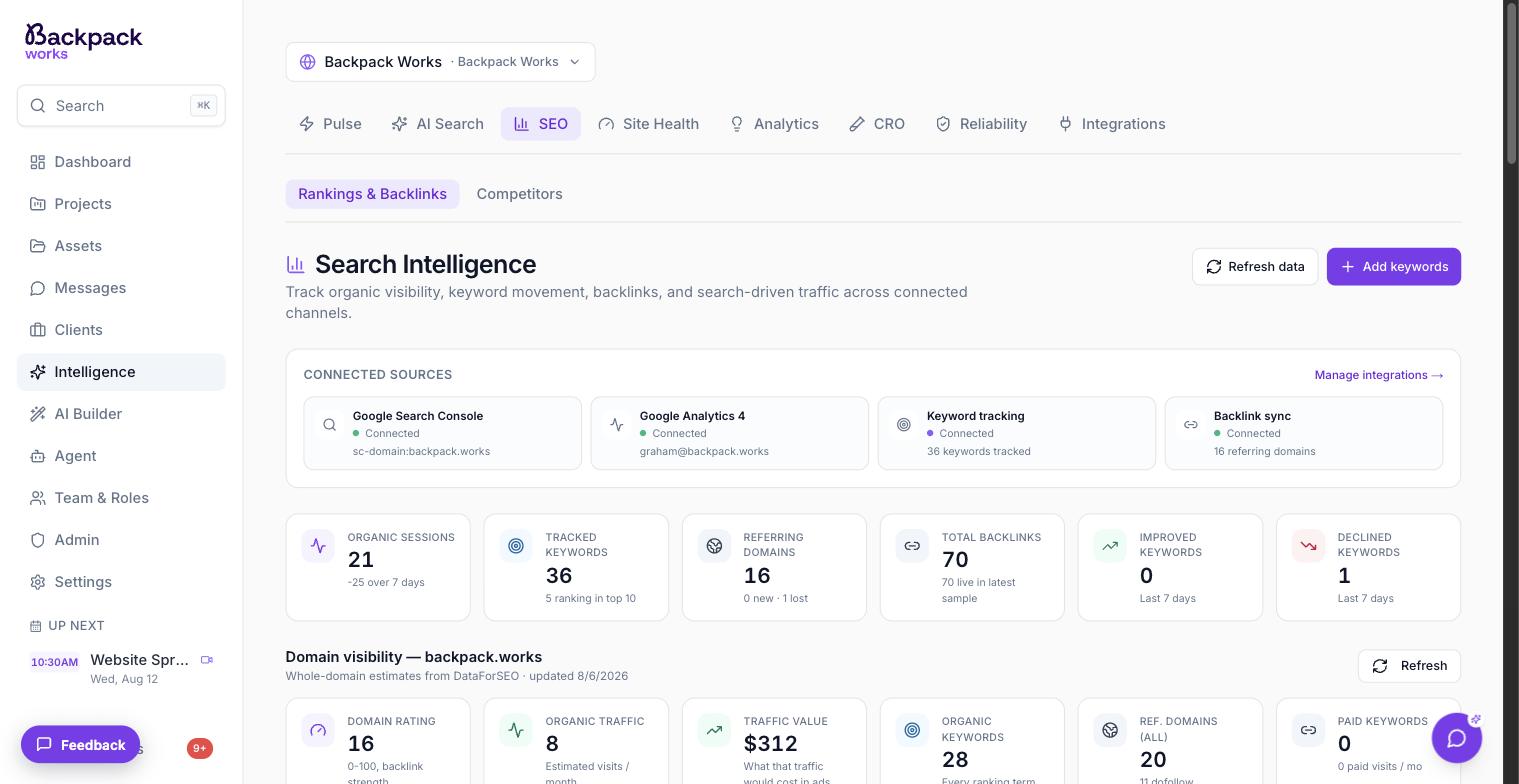
Connected sources first
The strip across the top of Rankings & Backlinks shows four sources and the exact state of each: Google Search Console, Google Analytics 4, Keyword tracking and Backlink sync. Each reads Not connected, Choose a property to finish, Reconnect required, or the resource it is connected to.
"Choose a property to finish" is the one that catches people. Signing in with Google is not the same as picking which property to read — an integration in that state syncs nothing. Click through and pick one.
Keyword tracking and Backlink sync turn green only when this site actually has tracked keywords or indexed referring domains. Having a provider configured is not enough to make them green, which is intentional.
The numbers, and where they come from
Six metrics run across the top: organic sessions, tracked keywords, referring domains, total backlinks, improved keywords and declined keywords. Below them, Domain visibility gives whole-domain estimates: Domain Rating, organic traffic, traffic value, organic keywords, referring domains and paid keywords.
Domain visibility is read from a cache, not fetched on load. A cold cache shows dashes and an Analyze domain button. This is deliberate: those figures cost money per lookup, and opening a tab should not spend your budget. You decide when to spend it.
Tracking keywords
Press Add keywords, pick a country, and either type your terms or take the AI suggestions. Positions refresh daily at 09:00 UTC, and only for sites that have at least one tracked keyword.
The Keyword movement table shows position, 7-day and 28-day change, search volume and the URL Google is actually choosing for that term. That last column is the one people miss — if Google is ranking the wrong page for a keyword you care about, that is a content problem you can act on.
Backlinks
Referring domains and recent backlinks, synced weekly on Mondays at 10:00 UTC. Weekly rather than daily because backlink data does not change fast enough to justify the cost of checking more often.
Syncing
You will rarely need to press Refresh data. Any connection that has not synced in 24 hours refreshes in the background when you open the page. The button is there for when you have just changed something and do not want to wait.
Competitors
Add a competitor domain and we analyse it against yours. The left rail lists everyone you track with their Domain Rating and a win-loss bar across shared keywords. Pick one and you get a comparison strip — Domain Rating, organic traffic, organic keywords, referring domains — plus four tabs:
- What to do — the shortlist, if you only read one tab.
- Shared keywords — terms you both rank for, and who is winning each.
- Backlink gap — domains linking to them and not to you.
- Their top pages — what is actually pulling their traffic.
There is also an Explore any domain box for a one-off look at a domain you do not want to track, and you can point it at your own domain to see yourself the way the tool sees a competitor.
Competitors you list on an AI Search target are analysed here automatically in the background. If you see a spinner row on a competitor you did not add, that is where it came from.