

CRO: A/B tests, widgets and personalization
CRO covers three surfaces that all run off the same install: A/B Tests, Widgets and Personalization.
One snippet, not three
A single script tag in your <head> powers all of it. Once it is live, every test, widget and personalization ships without your developer deploying anything.
If you use Google Tag Manager, Create tag in GTM puts the snippet into your container as a Custom HTML tag on the All Pages trigger and versions the change. You still publish the container yourself.
We consider the snippet installed if your site has served it in the last 14 days. A site that goes quiet for two weeks will start showing the install card again — that is a real signal, not a glitch, and usually means a deploy dropped the tag.
Starting something
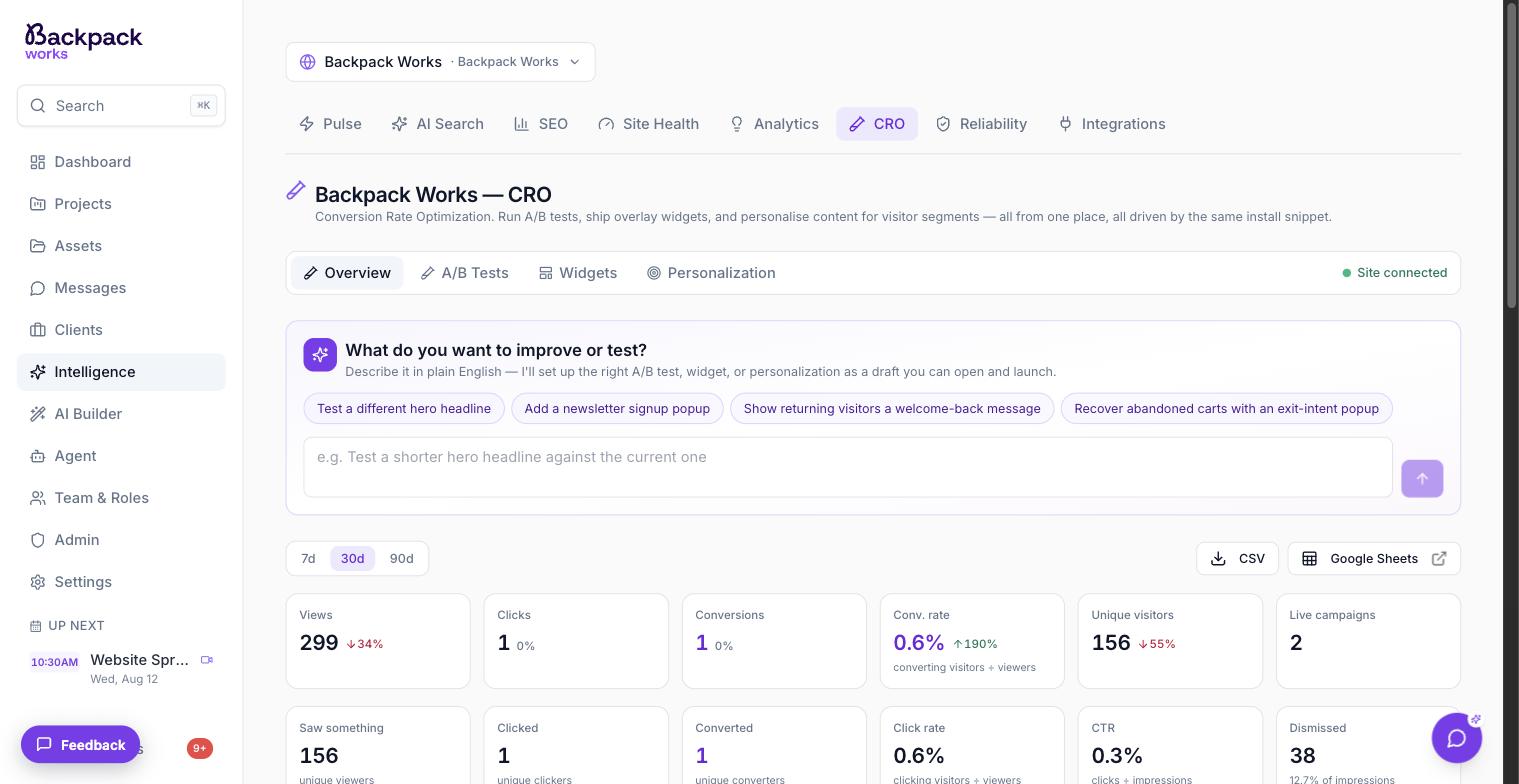
The box at the top of the Overview takes plain English: "Test a shorter hero headline against the current one". We set up the right surface — an A/B test, a widget, or a personalization — as a draft you open and launch. Nothing goes live from that box.
Reading the numbers
Two rows of metrics, and the difference between them matters.
The first row counts events: views, clicks, conversions, conversion rate, unique visitors, live campaigns, each with a change against the previous window of the same length.
The second row counts people: saw something, clicked, converted, click rate, CTR, dismissed. Rates here are per visitor, not per impression — a visitor who saw a widget four times is one viewer. Each tile says which it is doing underneath the number.
Switch the window with 7d / 30d / 90d, and export to CSV or Google Sheets.
A/B Tests
Three kinds:
- Visual — same URL, changes applied to the page. Edit variants in the visual editor.
- URL split — control against one variant URL.
- Multivariate — three or more URLs.
Give it a name, a hypothesis and a path pattern, then start it. The snippet handles bucketing and delivery; results come from exposure and conversion events. Deleting a test removes it from the list but keeps its history, so you can restore it.
Widgets
Start from the template gallery — previews render in your actual brand colour and corner radius, so what you see is what your visitors will see. The editor covers theme, targeting (UTM source, medium and campaign, device, country, new versus returning, time window), triggers (delay, scroll depth, minimum page views in the session), sections and form fields.
Each widget has its own analytics page with a view-to-click-to-conversion funnel and breakdowns by device and page.
Personalization
Three sections: where it applies, who sees it, and what changes. The WYSIWYG editor loads your real site in a frame and lets you click the element you want to change instead of typing a CSS selector. It needs the snippet to be live on the site to work; without it you get install instructions instead.
When nothing is recording
Open Tracking diagnostics on the Overview. It checks six things and names the one that is wrong:
- Database schema.
- Deployed snippet freshness — a stale cached snippet fires views but not clicks. If views climb and clicks stay at zero, this is almost always why.
- Events recorded.
- CDN base configuration.
- Consent mode.
- Live surfaces — flags widgets gated behind a trigger and personalizations targeted at a country, which will not fire on a plain page load and can look broken when they are working correctly.
Consent
Consent mode genuinely suppresses tracking rather than just labelling it. In auto and strict, events are held until your consent banner grants analytics; auto releases them after about two seconds only when no consent platform is detected. Setting it to off tracks regardless. Defaults match OneTrust, Cookiebot, CookieYes and Osano, and the category mapping is editable.